Worried about your sales?
Skyrocket Your Website Conversions with PROOF!

Boost your Sales, Build your Brand and Growth Your Business with PROOF Notifications!
Engage. Convert. Retain.

     TRY BEFORE TO BUY!  NO CREDIT CARD REQUIRED.

200% Increase Conversions

150% Increase Brand Trust

Social Media Exposure

Cloud-Based Platform

Simple Website Integration

+70%

of costumers says Positive buyers reviews make them trust a product or a business more

+80%

of costumers trust online reviews left by other buyers as much as personal recommendations

+85%

of costumers read online reviews to determinate if a product or a local business is good or bad

+80%

of costumers read up to 10 reviews before they can trust a business or a product

SOCIAL PROOF NOTIFICATIONS

THIS IS A MUST-HAVE MARKETING TOOL FOR ANY WEBSITE OWNER!

ENGAGE

Over 95% of visitors leave your site without taking any action. Be PRO-ACTIVE and interact with your visitors! Display engaging Messages, Pop-ups, Interactive Widgets on your website.

CONVERT

You know that just 1% of your spending on website traffic is converted in leads and sales? Start using PROOF Notifications to increase your Trust, generate Leads and boost sales.

RETAIN

Retain your Customers & Subscribers automatically. Acquiring will cost you up to 5 times more than retaining your existing customers! Be Smart. Be SocialProof!

Who needs PROOF notifications?

Do you run a local business, a blog or magazine? 

Do you sell  products or services online? Do you run an affiliate marketing website? Do you do practically something online?

It’s simple and clear! If you use the internet for ANYTHING… you will need to engage with your visitors to transform them from simple visitors into customers or  subscribers!

SocialProof gives you access to our platform to engage with your visitors, you can create any type of notification do you want  with just few clicks! 

SocialProof will increase your conversion rate by 200%!

Get access now to SocialProof Platform with NO RISKS! 
We offer 30 DAYS MONEY BACK GUARANTEE!

What is SocialProof?

Play Video

See the video of Adam Erhart he is offering the best definition!

WHY YOU SHOULD USE PROOF NOTIFICATIONS?

There are a psychological secret reveals that people tends to follow the herd instinct. It means that when a visitor see the proof showing that there had other people who are already bought a product or subscribed already, he will feel secure to buy too.

Over 90%of customers think that “Since a so many other people take actions then this is definitely a good deal to get in”.

There is a psychological secret: It’s all about feeling secure. People feel secure when they see that  others already subscribed to a website or a service or they already bought that service or a product and are leaving good reviews! When they are on your website, shop or your blog, they are thinking whether they should buy or not; they are questioning their own judgement. When they see that someone else taking action, that feeling of insecurity goes away.“So many people can’t be wrong. If they are already in, then this is a good deal. I am going to get in too.” That’s it. One little encouraging push and you make that sale, get that lead.

Social Proof is evidence that is so strong it will be statistically unreasonable to deny it.
Russell Targ – physicist, parapsychologist and author

ESSENTIAL FEATURES

BOOST CONVERSATIONS

Using PROOF Social Proof Notifications your website conversions will increase by 200%!

Build Credibility

Over 80% people will trust a product or service if its recommended by others.

Timing Rules

Control your notifications display time, speed, delay and much more

Fully Responsive

Display responsive notifications which will be visible on any device.

Easy integration

PROOF is easy to integrate with WordPress, PHP, HTML, Magneto, OpenCart etc.

No Technical Skills

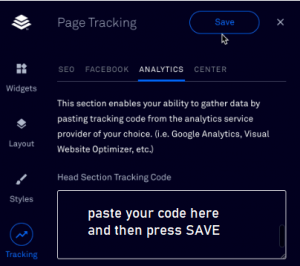
Setup PROOF without any technical skills. Just copy-past a piece of code.

Create Notifications

PROOF is super easy and simple, will take less than 3 minutes to create any Notification!

Tracking Conversions

Deploy the right messages that suites your business and Track Live Conversions.

All Time Hi & High

Be active and pro-active. Show all time events if you don’t have many visitors.

Display Rules

You decide how and when to display your notifications on the website.

White Label

Use your brand, set your notification icon, title color, text, link and more.

Page Visits

Display recent page visits and drive traffic to the most important pages!

PROOF NOTIFICATIONS

Real stats about PROOF notifications

8,000+

websites are using PROOF notifications to increase their online conversion

100+

costumers decided to become our resellers OF PROOF Notifications to make more money!

800+

companies, marketers, shops and bloggers are using PROOF to grow their online businesses

100,000+

PROOF notifications was setup so far by our customers to increase their conversion and brand trust!

PROOF NOTIFICATIONS

CREATE ANY TYPE OF NOTIFICATION DO YOU WANT IN LESS THAN 3 MINUTES!

HOW IT WORKS?

Integrate  PROOF on any website. Just follow 3 simple steps!

STEP 1

Insert the Pixel Code On Your Website Just copy-paste our pixel code on your website. It works with any type of website (WordPress, HTML, Joomla, etc.)

STEP 2

Create PROOF Notification PROOF is super easy, will take less than 5 minutes to create any type of SocialProof notification do you want!

STEP 3

Track Conversions Deploy the right messages that suites your business and Track Live Conversions.

Integration with any kind of website

PROOF is simple, fast and easy to integrate with a single line of code – just copy and paste.

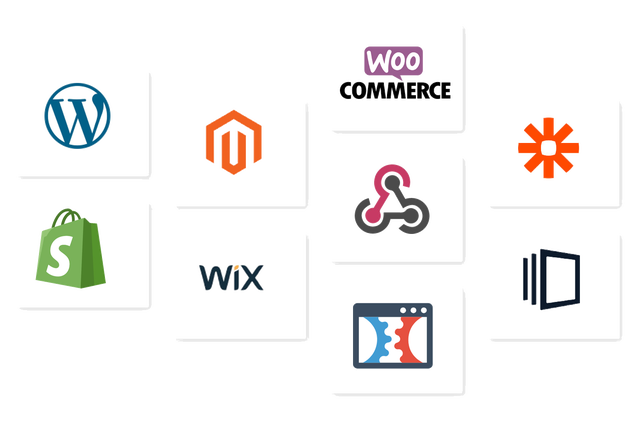
It supports all platforms like WordPress, WiX, Squarespace,Magneto, OpenCart, Instapage, Shopify or any website builded on PHP or HTML.

Webhooks are user-defined HTTP callbacks. They are triggered by some event in a web application and can facilitate integrating different applications or third-party APIs: Mailchimp, ActiveCampaign and many more.

SIMPLE PLANS & PRICES

Get the plan which fit your needs!

Monthly

Unlimited Campaigns

Unlimited Domains

Unlimited Subdomains

Unlimited Notifications

Unlimited Impressions

All Type of Notifications 

Removable Branding

Custom Branding

$9.99/month

Annually

Unlimited Campaigns

Unlimited Domains

Unlimited Subdomains

Unlimited Notifications

Unlimited Impressions

All Type of Notifications 

Removable Branding

Custom Branding

$99.99/year

Lifetime

Unlimited Campaigns

Unlimited Domains

Unlimited Subdomains

Unlimited Notifications

Unlimited Impressions

All Type of Notifications 

Removable Branding

Custom Branding

$299.99/once

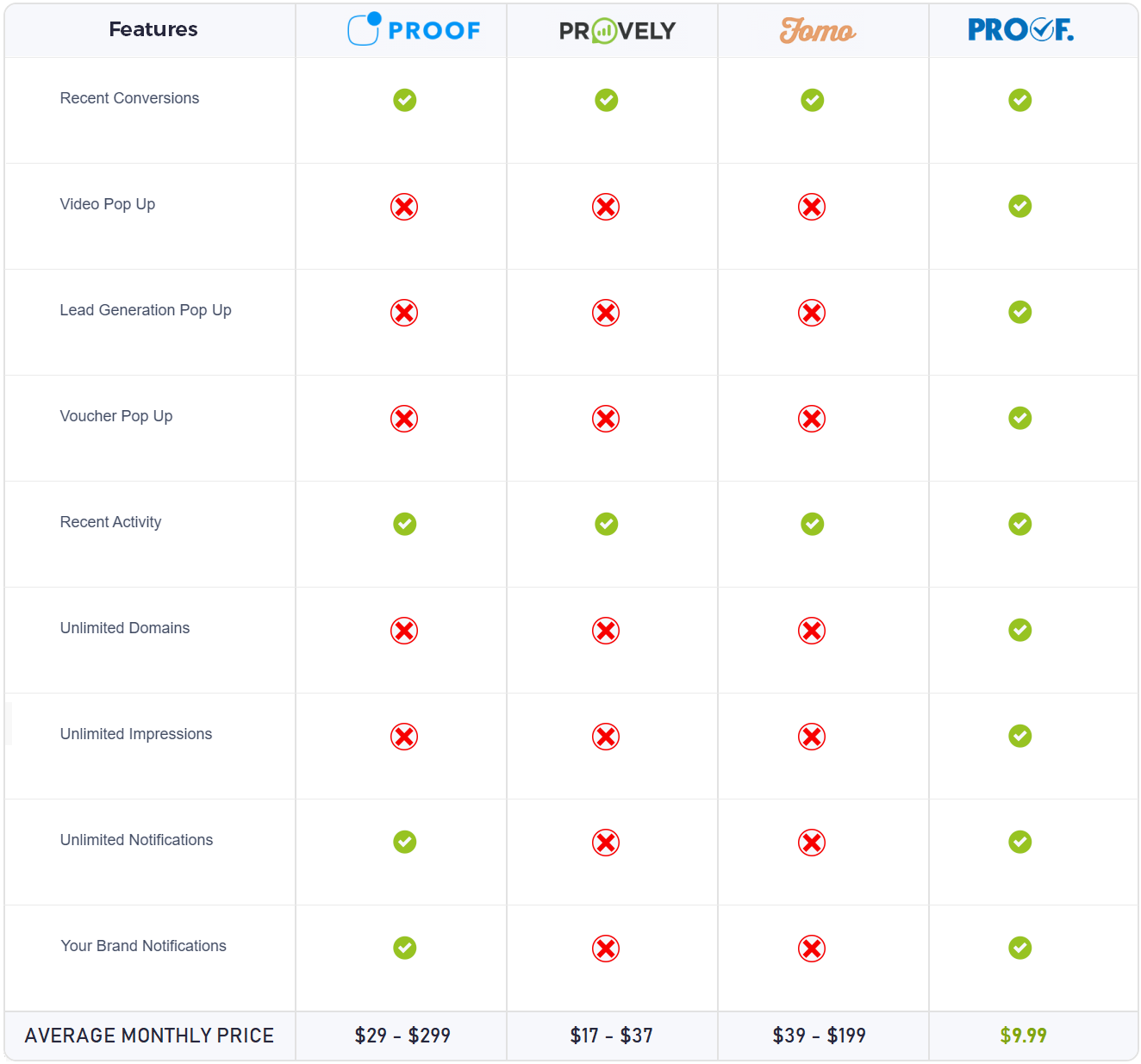
PRICE COMPARISON

Compare our prices with competitors

RESELLER PROGRAM

THIS IS A BUSINESS-IN-A-BOX

Simple & Affordable Prices
Start Your Own Business
Keep 100% of your sales!

If you want to start your own business or if you run already an online business and do you want to expand your portfolio then you are in the right place!

Sell PROOF at your own prices and keep 100% of your sales! This is a business with no headache for you.
Our technical team will offer support to your clients!

This is a great opportunity to anyone who want to make money online without spending 1,000s of dollars!
Apply now to become our reseller partner!

Reseller
PAY MONTHLY

  • Unlimited Campaigns
  • Unlimited Domains
  • Unlimited Subdomains
  • Unlimited Notifications
  • Unlimited Impressions
  • All Type of Notifications 
  • Removable Branding
  • Custom Branding

$49.99
Month

Reseller
PAY ANNUALLY

  • Unlimited Campaigns
  • Unlimited Domains
  • Unlimited Subdomains
  • Unlimited Notifications
  • Unlimited Impressions
  • All Type of Notifications 
  • Removable Branding
  • Custom Branding

$299.99
Year

FAQ

Frequently Asked Questions

During the Trial period we are offering free accounts with no credit card required. There is no Credit Card requested and no  obligation to continue using PROOF.

Yes, you can use it for every conversion type, not just sales. Use it for list-building, eBook signup, bonuses, anything you want. It works with every type of conversion.

Yes – All the widgets will work across all screen types and resolutions. One tip though – remember not to “crowd” your website with too many notifications. Please also test your website on different screens to check for anything being “blocked”. In each notification settings you can toggle on/off whether or not to display the notification when pixels available are smaller than 768px.

Yes you can. In the notification settings you can specify which exact URL or a URL that contains, begins with, or ends with your chosen text. As an example we have an emoji feedback widget set-up to show up on this page only. Note, we have also configured it to wait 10 seconds to appear and then stay for 15 seconds.

Yes you can. For each and every notification you configure you can choose to show it or not. In addition you can also set-up custom branding for your entire campaign. Choose any text as well as an optional hyperlink.

Yes you can. From your dashboard you can change the text colour, the background colour and if you want rounded or square borders. Where appropriate you can also change images, videos and icons. Each customisation is on a widget by widget basis, so if you want to blend in on one of your pages, but have a contrasting colours on another one it’s possible. It could also be worth mentioning you are free to choose at which position on your page the notification will appear – e.g. top right, middle center, bottom left.

We are here to help – please sign up for an account and then email us and we will get you up and running. An installation guide is available here.

Impression represents a single displayed trigger on your website.

Is very simple. Our RESELLER program is simple and affordable. You can resell PROOF to unlimited clients at your own prices and you will keep 100% of your sales! You will pay us only the monthly or annually price according with the plan which you choose. 

Anyone who want to make money 🙂!

If you want to start your own business or if you run already an online business and do you want to expand your portfolio then you are in the right place! If you run a SEO, online marketing agency or a hosting website and you will like to offer more products to your clients then you can offer PROOF at your own prices!

How you can see we charge only $49.99 per month or $299.99 per year! Some of our partners (hosting providers) are offering a  PROOF account to their clients for free as a Bonus!

If you are you running a blog, videoblog or if you have more than 5,000 followers on Instagram, Twitter, Facebook we can offer you a free annual account and in return you can write a post on your blog, Facebook Page,etc. about our marketing tools or just create a short YouTube review and we will offer 20% Discount to your followers!

Shoot us a message and we’ll be happy to discuss about it.

You can add as many websites as you want from as per your chosen plan

Install the script

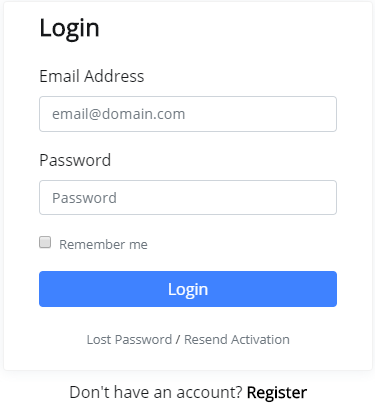
1) Login on account at https://clientpanel.co/socialproof/login/

2) From the dashboard click on the Install Script button or go to https://clientpanel.co/socialproof/install/

3) Copy and paste the code into your website header – before the end of the “/head”

Note: If you are wondering where to find the header of your website – that will vary by platform.

Some common platforms are shown below. Feel free to contact us at support@proofnotifications.com for help.

4) With the code deployed you can click “Check Activity” and your chosen domain should show up with an “Active” message.

WordPress

Some WordPress themes have an option to paste the code in from the WP-admin dashboard. Pictured below the screen from “Flatsome” theme.

If this is not already baked into your theme you can install a plugin to achieve the same functionality.

https://wordpress.org/plugins/header-footer-code-manager/ is one example.

 If plugins are not your thing and you have access to the code of your website you can edit the header.php of your active theme.

Google Tag Manager

  1. Create a new tag

  2. Select “Custom HTML” for the tag configuration

  3. Paste the PROOF code into the HTML section

  4. Add an “All Pages” trigger (selective pages can be triggered from PROOF SaaS config)

  5. Save, Submit & Publish

 Squarespace

  1. Login to your Squarespace account

  2. Click “Settings” and then scroll to “Advanced” finally “Code Injection”

  3. Paste the Pushreact code into the box marked HEADER

  4. Click Save.

 Wix

  1. Login to your Wix account

  2. Click “Manage & Edit Site” and then scroll to “Tracking & Analytics”

  3. Click on “+ New Tool” then select “Custom”

  4. Paste the Pushreact code into the box marked “Paste the code snippet here”

  5. Name your code “PushReact”

  6. Select “All Pages” – Load code on each new page

  7. Click on “Place code in Head”.

  8. Click Save.


For other platforms feel free to contact us for help.

1) Login at https://clientpanel.co/socialproof/login/

2) Once logged in at https://clientpanel.co/socialproof/dashboard/ click the Create Campaign button

3) Give your campaign a name, if you have multiple websites this could be the site name. You could also give a descriptive name such as “Black Friday”

4) Next add the domain that the campaign will be live on. Include the “www.” or not as appropriate. Press submit to move on.

Note: If your website is live on https://www. and https:// then toggle the “Include Subdomains” option to on.

5) Now we can start creating the first widget. To get started click on the campaign you created in the previous step.

1) To create a notification, click on the “Create Notification” button.

2) Now choose which type of notification you want to display on the website. You can preview them by clicking on them.

3) Give your notification a name. This might be as simple as using the same name as the widget type (e.g. “Coupon” for the coupon type), but you may have a naming convention that helps you later on (e.g. “Black Friday 2019 coupon” or “Live counter checkout page”).

4) Click the blue submit button under the widget type selector.

 Now we are into the settings stage.

Basic – choose what text you want to display and other configurations depending on the widget type. If appropriate you can change the icon / image, and also choose (optional) a URL that the user goes to if they should click on the widget

Triggers – This is where you control where on your website the widget will appear. This can be all pages, or specific pages, or a page type.

Examples:

  • Exact match: domain.com/checkout/
  • Contains: domain.com/product/ (for all product pages on a webshop)

You can also have a time lag after page load when the widget should appear.

Finally you can configure if the widget will be for all devices or desktop only.

Display – Here we can dictate how low long the widget should appear for and how we want it positioned. We can also choose if the user can close the widget and if the branding should appear (default branding is “Notifications by TRUST” but you can change that to your own brand (covered below).

Customize – In this section we can change the colours of the headlines, descriptions and background. HEX colour codes are supported e.g. #00FFFF for aqua blue. We can also choose the border radius of the widget.Press the blue submit button to save your widget. All changes go live straight away.

In the campaign section you can change the brand name that appears on each notification.

  1. From https://clientpanel.co/socialproof/dashboard/ click on the campaign you want to manage
  2. Click on the “Custom Branding” button, top right.
  3. Insert the brand name you want to use. Emojis are supported.
  4. Insert your website URL (mandatory for change to be active)
  5. Click submit

 This branding will be used on all the notifications within the campaign, but the branding can be toggled on or off from the Settings > Display section of each notification

Our plans are limited by number of monthly impressions. Based on the number of website visitors you can choose plan that will fit your needs.

We can change the actual plans and prices or we can add new plans at any time. All changes will be announced with 30 days in advance and the increase can’t be higher than 20% YOY (year on year).

These changes will not affect the users which bought a Lifetime Plan. If you are on the Lifetime Plan with Unlimited Usage you will remain on this plan for ever, you will not be requested to pay any other fees.

SaaS stands for Software as a Service

Software as a service is a software licensing and delivery model in which software is licensed on a subscription basis and is centrally hosted. It is sometimes referred to as “on-demand software”. This is a method in which software is accessed online via a subscription, rather than bought and installed on individual computers.

The dashboard is only in English at this stage, but the widgets can contain any text you want – that means yes for Spanish, German and other non-English languages. We also support emojis. Unfortunately full support for right to left languages such as Arabic, Kurdish and Hebrew are not provided.

We protect your data with advanced security measures. All your data is encrypted and stored securely with one way hashing algorithm to protect your passwords from anyone to see. We use PayPal for payment processing. We never store your card details on our servers. Check our Privacy Policy for more information.

No. Not at all. We call a very small JS file using asynchronous technology.

GET IN TOUCH

Send us a message